Sample text in [brackets], replace with yours · CV, Resume & Cover Letter Templates
CV Format for Government Jobs in Pakistan (Word & PDF)
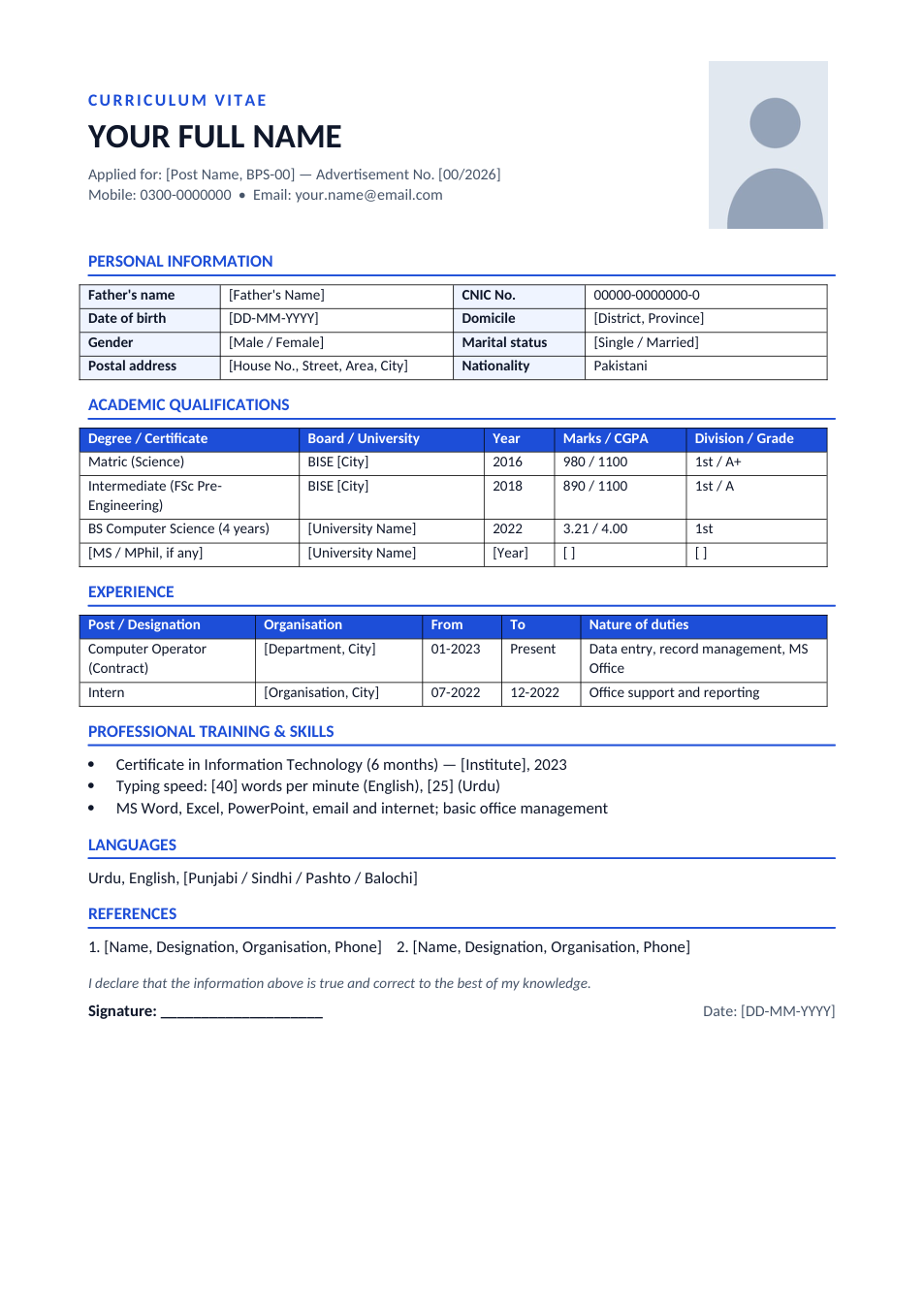
The CV format government departments expect: photo, father's name, CNIC, domicile, a marks table and an experience table.
Opens in your browser. No Word needed, no signup.
Free for personal and commercial use · No watermark · Updated October 2026
Guide
About this government job cv template
Government departments in Pakistan check eligibility before anything else: age on the closing date, domicile for the quota, and the exact marks and division of each qualification. A private-sector CV hides those details in paragraphs; this format puts them in tables a dealing assistant can check in seconds. It includes a photo, the post and advertisement number you are applying for, personal information with CNIC and domicile, an academic table (board or university, year, marks, division), an experience table and a signed declaration.
How to fill in this government job CV
- 1
Open it with "Edit online", or download the Word file.
- 2
Write the exact post name, BPS scale and advertisement number from the ad.
- 3
Fill in father's name, CNIC, date of birth and domicile exactly as on your documents.
- 4
Enter every qualification with marks obtained / total marks and division, matching your certificates.
- 5
Add experience with exact dates, sign the declaration, and print or save as PDF.
Tips for government job applications
Match your documents
Names, dates and marks must match your CNIC and certificates exactly. A mismatch can get the application rejected.
Check age and domicile
Work out your age on the closing date and confirm your domicile is eligible for the quota before applying.
Attach in the ad's order
Attach attested copies in the order the advertisement lists them. Merge scans into one PDF for online forms.
Keep the photo formal
Use a recent passport-size photo with a plain background, the same one as on the application form.
Frequently Asked Questions
Tools that help
Word to PDF
Convert Word documents to PDF format with perfect formatting
Passport Photo Maker
Create passport, visa, and ID photos with correct size, DPI, and white background
Merge PDF
Combine multiple PDF files into one document
Compress PDF
Reduce PDF file size without losing quality