iLovePDF is one of the best-known PDF sites, and it has earned that. When we rebuilt FileConvy's PDF tools this month, we used it as the benchmark. We put the same files through both sites, wrote down what happened and fixed what we were missing.
This post is the result. It covers the free plan only, because that's what most people use. It also says where iLovePDF is still ahead.
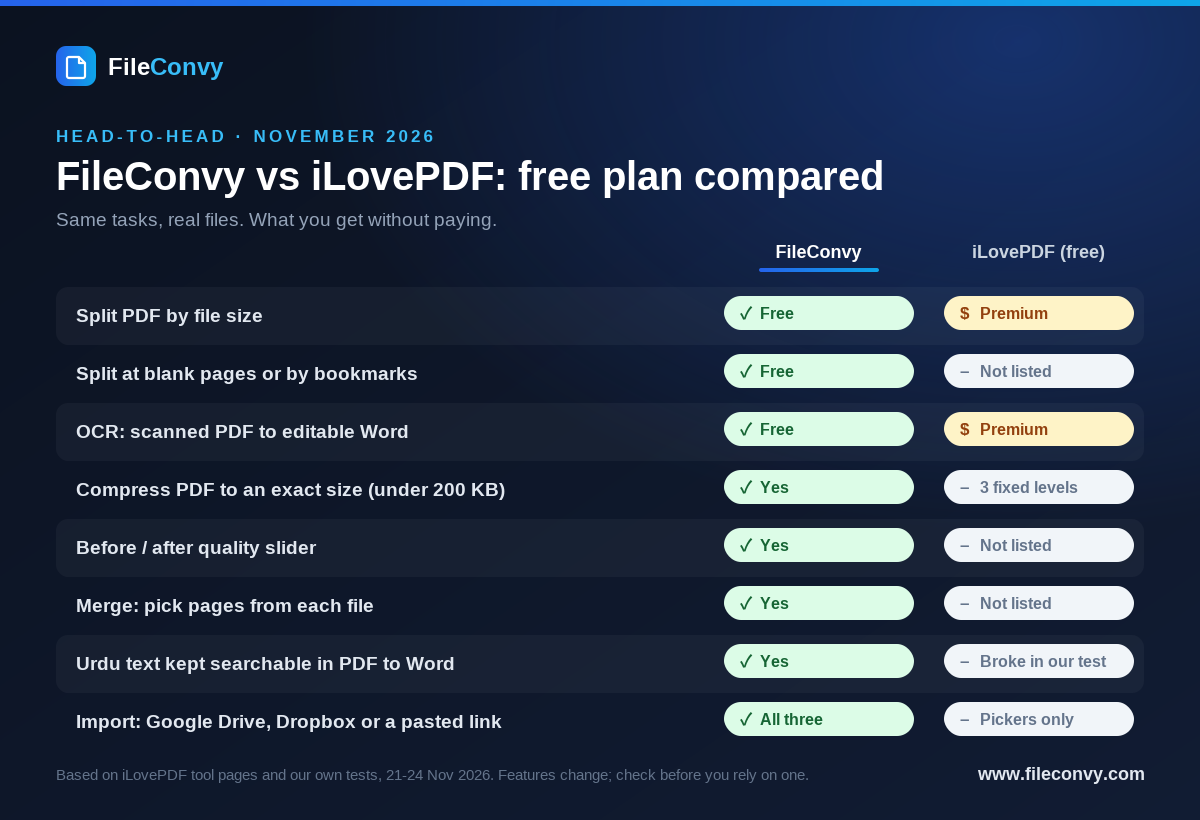
Short answer: both sites merge, split, compress and convert PDFs free, without a watermark. FileConvy's free plan also does several things that iLovePDF keeps for Premium or doesn't offer: split by file size, OCR for scanned PDFs in PDF to Word, compress to an exact size such as under 200 KB, and splitting at blank pages, by bookmarks or by text. iLovePDF is better if you need desktop and phone apps, or the cleanest Word layout from complex magazine-style pages.
How We Tested
- Dates: 21 to 24 November 2026.
- Files: a simple report, a three-column magazine page with a merged-cell table, a scanned page with no text layer, a 14-page product manual with 39 images, a bank-statement-style table with dd-mm-yyyy dates, and documents with Urdu text.
- iLovePDF: free plan, no account. Where a feature isn't on the free plan, we went by what iLovePDF's own tool pages say, and we name the page.
- FileConvy: the live site, with the tool versions described below.
Both products change often. If a row below matters to you, check it on the day.
The Comparison, Tool by Tool
| Task | FileConvy (free) | iLovePDF (free) |
|---|---|---|
| Split by page ranges | Yes: click ✂ between page previews, or type ranges | Yes: custom and fixed ranges |
| Split by file size (e.g. 5 MB parts for email) | Yes, free, with an optional compress step | Premium (marked on the Split page) |
| Split at blank pages, by bookmarks or by text such as "Invoice No" | Yes, files named after the chapter or found line | Not listed on the Split page |
| Merge: choose pages from each file | Yes, with a page picker | Not listed; merges whole files |
| Merge: bookmarks per file, blank page for double-sided printing | Yes | Not listed |
| Merge: reorder, sort A-Z, rotate, password-protected files | Yes | Yes |
| Compress: three levels | Yes | Yes |
| Compress to a size limit (under 100 KB, 200 KB, 1 MB) | Yes | Not listed |
| Compare quality before and after compressing | Yes, drag slider and zoom | Not listed |
| JPG to PDF: page size, orientation, margin | Yes | Yes |
| JPG to PDF: iPhone HEIC photos, live page preview | Yes | Not listed |
| PDF to Word: scanned page | Free OCR, editable text | Detects the scan, OCR is Premium |
| PDF to Word: Urdu / Arabic text | Kept as searchable Unicode | Turned into presentation forms in our test, so search and editing broke |
| PDF to Word: headings and lists | Yes (Heading 1-3, real numbered lists) | Yes, and cleaner on multi-column pages |
| PDF to Excel: dd-mm-yyyy dates | Kept day-first (01-11-2026 stays 1 November) | Swapped day and month in our test |
| Import from Google Drive or Dropbox | Yes: file picker, or paste a share link (Google Docs, Sheets and Slides are converted) | Yes: file picker |
| Desktop and phone apps | Installable web app | Yes, native apps |
| Watermark on results | No | No |
| Account needed | No | No |
Where FileConvy Is Ahead
1. Splitting a PDF is more than page numbers
Most people who split a PDF want one of four things: a few pages out of a big file, parts small enough to email, one file per chapter, or one file per document in a scanned stack. The new Split PDF handles all four on the free plan:
- Visual cuts. Every page shows as a preview, coloured by the file it will go into. Click ✂ between two pages to cut there; click again to join.
- By file size. Type 5 MB and each part stays under it. Switch on "Compress images first" and you get fewer, smaller parts. iLovePDF marks this mode Premium.
- By bookmarks. One file per chapter, named after the chapter, so a 300-page manual becomes
01_Introduction.pdf,02_Installation.pdfand so on. Each part keeps its own bookmarks. - At blank pages. Scan 40 invoices with a blank sheet between each, and you get 40 PDFs; the blank sheets are left out.
- By text. Type "Invoice No" and a new file starts at every page that says it, named after that line, for example
03_Invoice No INV-1003.pdf.
When the split is done, you can download each file on its own or all of them as one ZIP.
2. Compress to the size a portal asks for
Job portals, university admissions and government forms often say "PDF under 200 KB". Three compression levels leave you guessing. Compress PDF takes a limit (100 KB, 200 KB, 300 KB, 500 KB, 1 MB or your own number) and keeps the quality as high as it can while fitting under it. A before-and-after slider lets you zoom in and check that the text is still sharp before you upload. It also handles up to 10 PDFs at once, black and white, and password-protected files.
3. Scanned PDFs become editable Word for free
A scanned page is a picture. Without OCR, a converter gives you a Word file with a picture in it. iLovePDF spots the scan and offers OCR, but OCR is a Premium feature. FileConvy's PDF to Word runs OCR on scanned pages automatically, free. For a whole document, OCR PDF adds a searchable text layer without making the file much bigger.
4. Urdu, Arabic and local date formats survive
This one matters in Pakistan, India and the Gulf. In our tests, iLovePDF's PDF to Word turned Urdu text into Arabic presentation-form characters. They look right on screen, but searching or editing them doesn't work, and some Urdu was dropped from a complex page. FileConvy kept the text as normal Unicode. In PDF to Excel, iLovePDF read 01-11-2026 as 11 January; FileConvy keeps dd-mm-yyyy dates day-first, the way bank statements in this region print them.
5. Merge exactly the pages you need
Merge PDF lets you open each file, click the pages you want (or type 1-3, odd, even), rotate a file, and add a bookmark for each document. A "blank page for double-sided printing" option adds a blank page after any file that ends on an odd page, so each document starts on a new sheet.
Where iLovePDF Is Still Better
An honest comparison needs this section.
- Apps. iLovePDF has desktop and phone apps. FileConvy is a web app that you can install to your home screen, but it isn't a native app.
- Complex layouts in Word. On a three-column magazine page, iLovePDF's Word file used real section columns and text boxes. FileConvy keeps every word and now adds real headings and lists, but multi-column pages still come out as a table layout.
- More tools and AI features. iLovePDF offers more tools in total, plus AI summarize and translate features and team accounts.
If those matter most to you, iLovePDF is a good choice.
What About Privacy?
Both sites upload your file to their servers to process it. iLovePDF's FAQ says files are kept for up to 2 hours and then removed. FileConvy deletes its temporary copies as soon as your result is sent back (the online editor keeps a file for its 3-hour editing session, and you can delete it sooner). Neither site needs an account for these tools. For sensitive documents, also read our guide on how to redact a PDF properly before you share it anywhere.
Which One Should You Use?
| If you need to… | Use |
|---|---|
| Split by size, chapters, blank pages or invoice number, free | FileConvy |
| Get a PDF under 200 KB for a form | FileConvy |
| Turn a scanned PDF into editable Word without paying | FileConvy |
| Convert documents with Urdu or Arabic text, or dd-mm-yyyy dates | FileConvy |
| Import a file someone sent you as a Drive or Dropbox link | FileConvy |
| Use a native desktop or phone app | iLovePDF |
| Convert a magazine-style multi-column page to Word | iLovePDF |
FAQ
Is FileConvy really free? Yes. The PDF tools in this post work without an account, without a watermark and without a page limit. A single file can be up to 50 MB.
Is splitting a PDF by file size free anywhere? On FileConvy, yes. On iLovePDF's Split page, the "Size" mode is marked Premium (checked 24 November 2026).
Can I split one scanned PDF into separate invoices? Yes. If there is a blank sheet between invoices, use "At blank pages". If each invoice says the same words at the top, such as "Invoice No", use "By text". For pages with no text layer, run OCR PDF first so the words can be found.
Does FileConvy keep my bookmarks when I split? Yes. Each part keeps the bookmarks that point into it.
Will iLovePDF or FileConvy change after this post? Almost certainly. We'll update the table when we re-test. The date at the top shows when it was last checked.